Recently Released
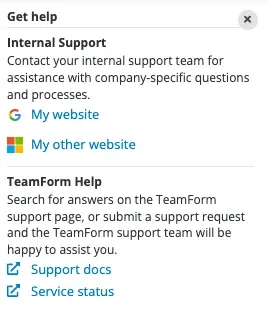
Team Management - Custom Links
We are making it easier for TeamForm admins at your organization to self manage custom links to both help / support use cases. We understand you have existing support processes, portals and other applications in your environment and often users may need to be directed to follow a different process in another tool.
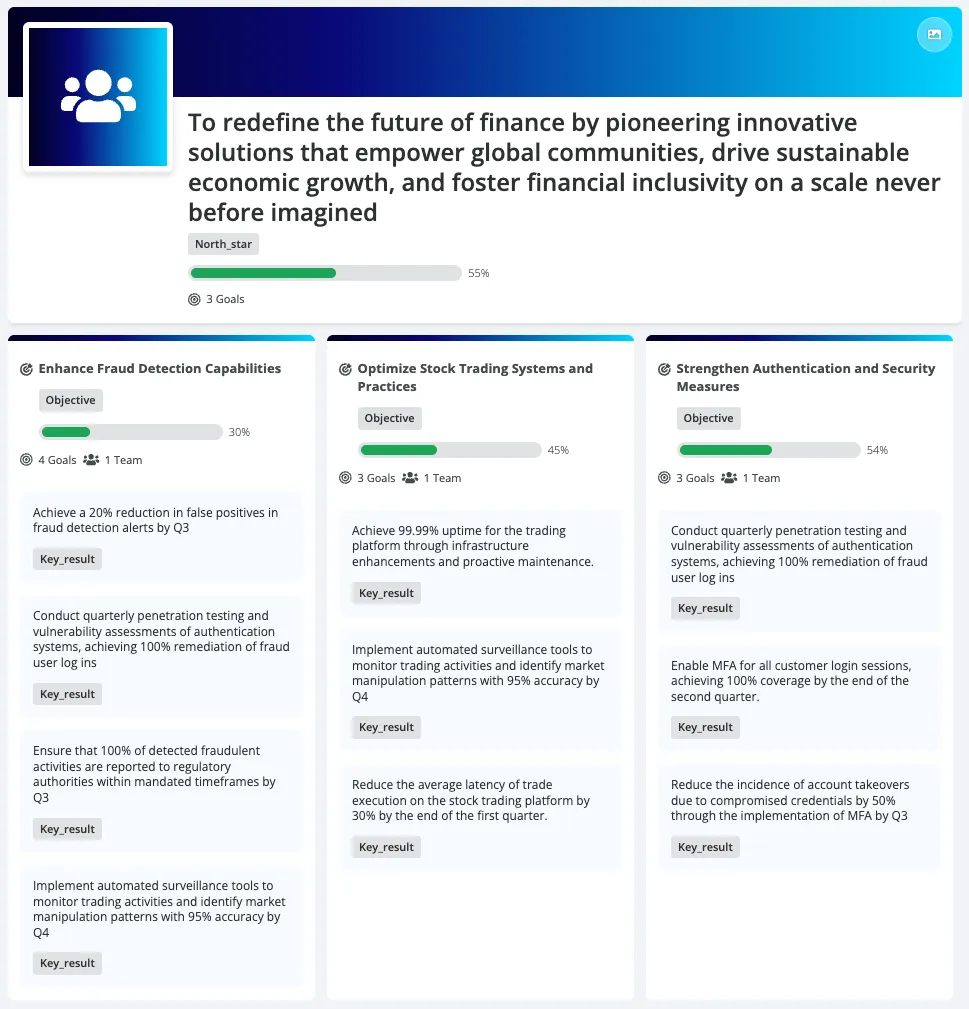
Team Management - Explore Goals
Building on the learnings from the Explore Teams views, we are applying the same layout and principles to help users navigate goals. This allows users to explore goals from the highest organizational level down to the work level (such as epics and other deliverables). This will provide anyone in the organization a clear way to understand and see how strategy flows down into goals and work, and identify which teams are responsible for each item.
Product Improvements
Team Management - Supply Teams External Management (Admin Feature)
We fixed a gap that allowed parent teams to created supply teams when those supply teams were externally managed (often by a HRIS such as SuccessFactors/Workday etc.). With this enhancement as long as your supply teams are configured with the following settings then the improved controls will now be in place.
To achieve this behaviour:
- Settings > Org Structure > Open top node / root team (this is often the company name)
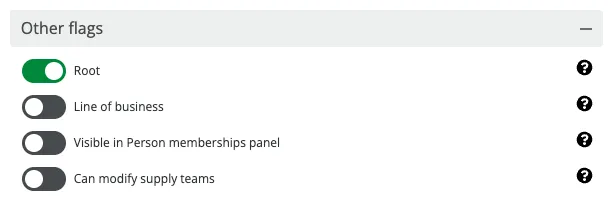
- Under the root team - there is a section
other flags, turn off the flagCan modify supply teamsthen click save
Team Management - Search Performance
Similar to our recent improvements in reporting, we’ve been working on refining search performance and behaviour to help you find what you’re looking for more quickly and easily. Over the coming month, we’ll continue releasing additional optimisations to make search results faster, more accurate, and more predictable.
Team Management - Allocations with Dates
We have added more flexibility to historical data locks. While TeamForm defaults to preventing edits prior to today, admins can now configure a specific date or a rolling window of days to define when the edit restriction begins.
Reporting – Access
We’ve fixed a long-standing issue where the Reporting icon in the app’s side navigation was not visible to users who had reporting access but were set up as Directory users. All existing access restrictions and permissions still apply. This change simply ensures the icon is visible to eligible reporting access users that are also Directory users.
Reporting – Performance
We’ve released improvements to the performance and reliability of the reporting extract job. As a result, changes made in TeamForm will now appear in TeamForm Reporting much faster. Reporting extracts now run hourly, and once started, the jobs now complete up to 10× faster than before.
Org Design - Org Charts
We have further improved the logical order and grouping of our menu items for teams and people now across team details page, team header, org charts and team and people cards on the org charts. This should provide a more consistent experience and avoid confusion when labels often referred to a group or a team sometimes and the action menu items were not in a consistent order.
We identified several usability gaps that have now been addressed. The Org Charts view was missing the add member action in the menu, which meant that actions such as adding, moving, or removing teams or people did not always refresh automatically, requiring users to manually refresh the page. This has now been restored, which means that when changes are made, Org Charts will refresh dynamically, allowing updates to appear immediately.
In addition, we’ve improved the logical order and grouping of action menu items for teams and people. These changes apply across the Team Details page, team header, Org Charts, and team and people cards within Org Charts. This creates a more consistent and intuitive experience, reducing confusion where labels previously referred to a team or a group inconsistently and where action menu items appeared in different orders across the product.
Ask TeamForm AI
Our AI assistant, Ask TeamForm, continues to evolve to help you get answers about people, teams, tags, goals and work - instantly and directly from your data using the chat interface.
Early Preview: Our AI generative Dashboard's can be created on the fly and iterated via conversation. We continue to expand our new Dashboard capability to support a wider range of charts and visualisations. Simply Ask TeamForm to create a /dashboard, and it do the rest.
Feedback: As we continue to learn and evolve Ask TeamForm, we’ve added a way for you to provide context-specific feedback to our team. If you receive an answer that you liked or one that didn’t quite hit the mark, simply hover over the thumbs up or thumbs down icons to share your feedback. This helps our team follow up and better understand what worked well and what can be improved.
We welcome your feedback on what questions you’d like Ask TeamForm to answer next!
Coming Soon
Supply Teams
Following the recent improvements to controlling supply team behaviour managed by external systems (e.g. your HRIS), we are planning additional usability enhancements. These will allow admins to add a link to another system or process used to manage the supply teams.
For example, if changes to Supply teams are managed in SuccessFactors or Workday and you already have an established process, admins will be able to provide a link along with a brief explanation of how to make those changes. This will help users quickly understand how to proceed and reduce confusion.
If a similar approach would also be useful for demand teams (for example, showing which TeamForm or leadership roles are allowed to make changes to a team’s membership), please reach out and share your use case with us.
Team Type Change
As you evolve your team setup, composition and types of teams, it is common to want to change the team type. Currently this is something that can only be performed by your admin team. For safe team type changes e.g. a change of type but within a demand team or a supply team, this can be exposed to power users and above so that they can do this themselves within clear constraints and low risks (e.g. compatible parent and child teams support the new team type etc.)
As your organization evolves its team structure, composition, and team types, it is common to need to change a team’s type. Currently, this action can only be performed by a TeamForm admin. For safe changes such as changing the type within the same demand or supply team, this capability can be made available to Power Users and above. This allows them to make these changes themselves within clear constraints and low risk with guardrails in place such as confirming that compatible parent and child teams support the new team type
Allocation Controls
We’re introducing more granular control over who can manage team rosters. These upcoming workspace settings will allow you to delegate membership edits based on your existing structure:
- Demand Hierarchy: A new rule that authorises users to manage memberships for their own demand teams and any associated child teams.
- Expanded Access Groups: We’re enhancing the existing ‘Access Groups’ feature so that granted access includes the authority to edit memberships for those specific teams and their nested children.
Explore Goals Evolution
We are continuing to evolve and improve the Explore Goals experience. Our next focus is a company-level page that will provide a more visual way to view your organization’s top strategic objectives. This will make it possible to visualise elements such as your mission, vision, and north star, and then link them directly to your goals, initiatives, and related work.
We would love your input on this. Please reach out to your TeamForm Customer Success contact or Account Manager to discuss your ideas and use cases.
We are also looking to enable deeper integration with our Ask TeamForm AI capability. This will help you learn more about the goals and work visualised in TeamForm, enabling you to gain valuable insights, identify gaps, and better align your strategy and execution.